

俄羅斯:將審查iPhone等外國公司設備 保數據安全
iPhone和特斯拉都屬于在各自領域領頭羊的品牌,推出的產品也也都是數一數二的,但對于一些國家而言,它們的產品可靠性和安全性還是在限制范圍內。近日,俄羅斯聯邦通信、信息技術
ItemDecoration 是 RecyclerView 組件的一個非常有用的功能,用于添加自定義的裝飾項(如分隔線、邊距、背景等)到 RecyclerView 的每個 item 之間或周圍。
recyclerView.addItemDecoration()ItemDecoration主要的三個方法:
 圖片
圖片
實現分割線效果需要 getItemOffsets()和 onDraw()2個方法,首先用 getItemOffsets給item下方空出一定高度的空間(例子中是1dp),然后用onDraw繪制這個空間。
public class SimpleDividerDecoration extends RecyclerView.ItemDecoration { private int dividerHeight; private Paint dividerPaint; public SimpleDividerDecoration(Context context) { dividerPaint = new Paint(); dividerPaint.setColor(context.getResources().getColor(R.color.colorAccent)); dividerHeight = context.getResources().getDimensionPixelSize(R.dimen.divider_height); } @Override public void getItemOffsets(Rect outRect, View view, RecyclerView parent, RecyclerView.State state) { super.getItemOffsets(outRect, view, parent, state); outRect.bottom = dividerHeight; } @Override public void onDraw(Canvas c, RecyclerView parent, RecyclerView.State state) { int childCount = parent.getChildCount(); int left = parent.getPaddingLeft(); int right = parent.getWidth() - parent.getPaddingRight(); for (int i = 0; i < childCount - 1; i++) { View view = parent.getChildAt(i); float top = view.getBottom(); float bottom = view.getBottom() + dividerHeight; c.drawRect(left, top, right, bottom, dividerPaint); } }}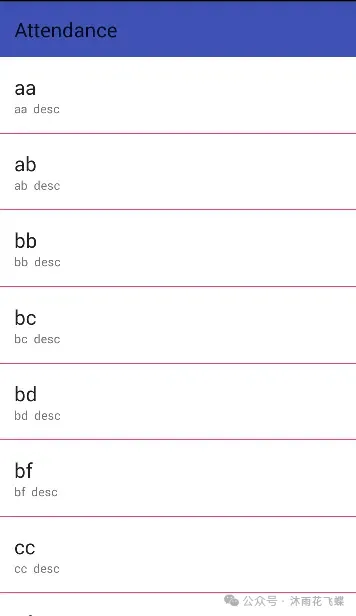 圖片
圖片
標簽都是覆蓋在內容之上的,可以用onDrawOver()來實現,這里簡單實現一個顏色標簽。
public class LeftAndRightTagDecoration extends RecyclerView.ItemDecoration { private int tagWidth; private Paint leftPaint; private Paint rightPaint; public LeftAndRightTagDecoration(Context context) { leftPaint = new Paint(); leftPaint.setColor(context.getResources().getColor(R.color.colorAccent)); rightPaint = new Paint(); rightPaint.setColor(context.getResources().getColor(R.color.colorPrimary)); tagWidth = context.getResources().getDimensionPixelSize(R.dimen.tag_width); } @Override public void onDrawOver(Canvas c, RecyclerView parent, RecyclerView.State state) { super.onDrawOver(c, parent, state); int childCount = parent.getChildCount(); for (int i = 0; i < childCount; i++) { View child = parent.getChildAt(i); int pos = parent.getChildAdapterPosition(child); boolean isLeft = pos % 2 == 0; if (isLeft) { float left = child.getLeft(); float right = left + tagWidth; float top = child.getTop(); float bottom = child.getBottom(); c.drawRect(left, top, right, bottom, leftPaint); } else { float right = child.getRight(); float left = right - tagWidth; float top = child.getTop(); float bottom = child.getBottom(); c.drawRect(left, top, right, bottom, rightPaint); } } }}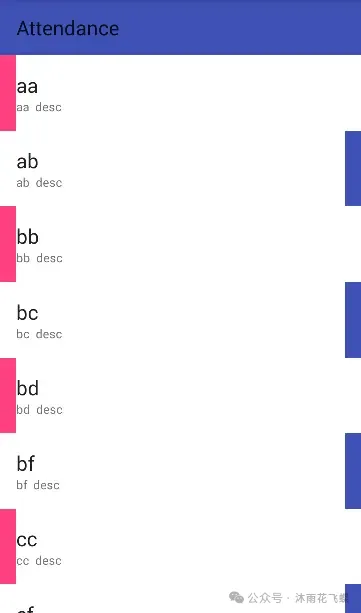 圖片
圖片
ItemDecoration是可以疊加的,可以將多個效果通過addItemDecoration方法疊加,將上面兩種效果疊加。
recyclerView.addItemDecoration(new LeftAndRightTagDecoration(this));recyclerView.addItemDecoration(new SimpleDividerDecoration(this));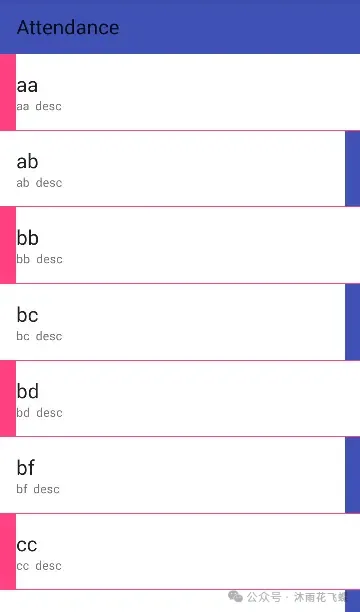 圖片
圖片
定義接口用來進行數據分組和獲取首字母,重寫getItemOffsets()和onDraw()方法,并根據數據進行分組處理。
public interface DecorationCallback { long getGroupId(int position); String getGroupFirstLine(int position); }public class SectionDecoration extends RecyclerView.ItemDecoration { private static final String TAG = "SectionDecoration"; private DecorationCallback callback; private TextPaint textPaint; private Paint paint; private int topGap; private Paint.FontMetrics fontMetrics; public SectionDecoration(Context context, DecorationCallback decorationCallback) { Resources res = context.getResources(); this.callback = decorationCallback; paint = new Paint(); paint.setColor(res.getColor(R.color.colorAccent)); textPaint = new TextPaint(); textPaint.setTypeface(Typeface.DEFAULT_BOLD); textPaint.setAntiAlias(true); textPaint.setTextSize(80); textPaint.setColor(Color.BLACK); textPaint.getFontMetrics(fontMetrics); textPaint.setTextAlign(Paint.Align.LEFT); fontMetrics = new Paint.FontMetrics(); topGap = res.getDimensionPixelSize(R.dimen.sectioned_top);//32dp } @Override public void getItemOffsets(Rect outRect, View view, RecyclerView parent, RecyclerView.State state) { super.getItemOffsets(outRect, view, parent, state); int pos = parent.getChildAdapterPosition(view); Log.i(TAG, "getItemOffsets:" + pos); long groupId = callback.getGroupId(pos); if (groupId < 0) return; if (pos == 0 || isFirstInGroup(pos)) {//同組的第一個才添加padding outRect.top = topGap; } else { outRect.top = 0; } } @Override public void onDraw(Canvas c, RecyclerView parent, RecyclerView.State state) { super.onDraw(c, parent, state); int left = parent.getPaddingLeft(); int right = parent.getWidth() - parent.getPaddingRight(); int childCount = parent.getChildCount(); for (int i = 0; i < childCount; i++) { View view = parent.getChildAt(i); int position = parent.getChildAdapterPosition(view); long groupId = callback.getGroupId(position); if (groupId < 0) return; String textLine = callback.getGroupFirstLine(position).toUpperCase(); if (position == 0 || isFirstInGroup(position)) { float top = view.getTop() - topGap; float bottom = view.getTop(); c.drawRect(left, top, right, bottom, paint);//繪制紅色矩形 c.drawText(textLine, left, bottom, textPaint);//繪制文本 } } } private boolean isFirstInGroup(int pos) { if (pos == 0) { return true; } else { long prevGroupId = callback.getGroupId(pos - 1); long groupId = callback.getGroupId(pos); return prevGroupId != groupId; } } public interface DecorationCallback { long getGroupId(int position); String getGroupFirstLine(int position); }}recyclerView.addItemDecoration(new SectionDecoration(this, new SectionDecoration.DecorationCallback() { @Override public long getGroupId(int position) { return Character.toUpperCase(dataList.get(position).getName().charAt(0)); } @Override public String getGroupFirstLine(int position) { return dataList.get(position).getName().substring(0, 1).toUpperCase(); }}));頭部吸頂效果,header不動肯定是要繪制item內容之上,需要重寫onDrawOver()方法,其和Section實現一樣。
public class PinnedSectionDecoration extends RecyclerView.ItemDecoration { private static final String TAG = "PinnedSectionDecoration"; private DecorationCallback callback; private TextPaint textPaint; private Paint paint; private int topGap; private Paint.FontMetrics fontMetrics; public PinnedSectionDecoration(Context context, DecorationCallback decorationCallback) { Resources res = context.getResources(); this.callback = decorationCallback; paint = new Paint(); paint.setColor(res.getColor(R.color.colorAccent)); textPaint = new TextPaint(); textPaint.setTypeface(Typeface.DEFAULT_BOLD); textPaint.setAntiAlias(true); textPaint.setTextSize(80); textPaint.setColor(Color.BLACK); textPaint.getFontMetrics(fontMetrics); textPaint.setTextAlign(Paint.Align.LEFT); fontMetrics = new Paint.FontMetrics(); topGap = res.getDimensionPixelSize(R.dimen.sectioned_top); } @Override public void getItemOffsets(Rect outRect, View view, RecyclerView parent, RecyclerView.State state) { super.getItemOffsets(outRect, view, parent, state); int pos = parent.getChildAdapterPosition(view); long groupId = callback.getGroupId(pos); if (groupId < 0) return; if (pos == 0 || isFirstInGroup(pos)) { outRect.top = topGap; } else { outRect.top = 0; } } @Override public void onDrawOver(Canvas c, RecyclerView parent, RecyclerView.State state) { super.onDrawOver(c, parent, state); int itemCount = state.getItemCount(); int childCount = parent.getChildCount(); int left = parent.getPaddingLeft(); int right = parent.getWidth() - parent.getPaddingRight(); float lineHeight = textPaint.getTextSize() + fontMetrics.descent; long preGroupId, groupId = -1; for (int i = 0; i < childCount; i++) { View view = parent.getChildAt(i); int position = parent.getChildAdapterPosition(view); preGroupId = groupId; groupId = callback.getGroupId(position); if (groupId < 0 || groupId == preGroupId) continue; String textLine = callback.getGroupFirstLine(position).toUpperCase(); if (TextUtils.isEmpty(textLine)) continue; int viewBottom = view.getBottom(); float textY = Math.max(topGap, view.getTop()); if (position + 1 < itemCount) { //下一個和當前不一樣移動當前 long nextGroupId = callback.getGroupId(position + 1); if (nextGroupId != groupId && viewBottom < textY ) {//組內最后一個view進入了header textY = viewBottom; } } c.drawRect(left, textY - topGap, right, textY, paint); c.drawText(textLine, left, textY, textPaint); } }} 圖片
圖片
本文鏈接:http://m.www897cc.com/showinfo-26-87958-0.htmlRecyclerView中ItemDecoration的精妙用法,實現自定義分隔線、邊距和背景效果
聲明:本網頁內容旨在傳播知識,若有侵權等問題請及時與本網聯系,我們將在第一時間刪除處理。郵件:2376512515@qq.com

Copyright ? 2016-2023 天津谷騏科技有限公司 版權所有 sitemap.xml
違法及侵權請聯系:2376512515@qq.com 津ICP備18001702號
 津公網安備 12010102000574號